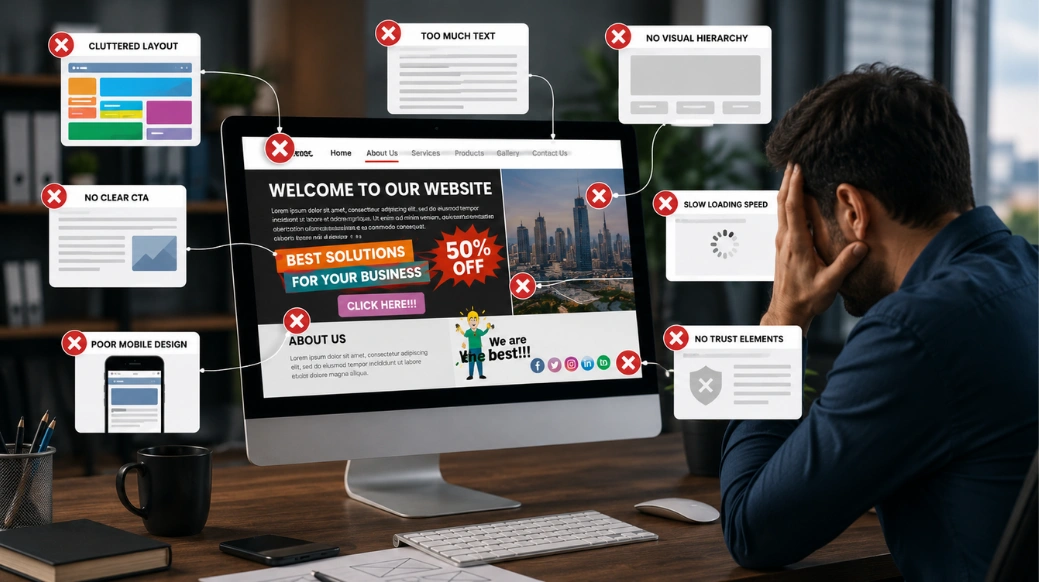
Your website is often the first place where customers experience your business. Before contacting your team, booking a service, or purchasing a product, most people visit your website to decide whether they can trust your brand. A professional website can help build credibility, improve customer engagement, and generate more business opportunities. However, a poorly designed website can create a negative impression and make potential customers leave. Studies show that users often form an opinion about a website within seconds. This means your website design, loading speed, content, and user experience can directly influence whether visitors stay or choose a competitor. Many businesses invest in websites but still struggle to receive inquiries or sales. The reason is not always their products or services — sometimes, common website design mistakes prevent visitors from becoming customers. Understanding these problems and improving your website can help increase leads, conversions, and business growth.
Businesses Need Websites That Generate Results
Today, a website is more than an online business profile. It works like a digital salesperson that represents your company every day.
Customers expect websites to provide quick answers, helpful information, and a smooth browsing experience.
A successful business website should:
-
Load quickly
-
Work properly on mobile devices
-
Have simple navigation
-
Provide clear information
-
Build customer trust
-
Encourage users to take action
Many companies focus only on making their websites visually attractive. A beautiful website is valuable, but design alone does not generate leads.
A website needs the right combination of user experience, SEO strategy, and conversion-focused design.
Website Design Mistakes That Reduce Leads and Sales
Even small website mistakes can affect customer decisions. Visitors expect a fast, simple, and helpful experience.
Here are some common website design mistakes businesses should avoid.
1. Slow Website Loading Speed
Website speed plays an important role in user experience and SEO performance.
When a website takes too long to load, visitors may leave before exploring your products or services.
Common reasons for slow websites include:
-
Large image files
-
Poor website coding
-
Unnecessary plugins
-
Low-quality hosting
-
Heavy website elements
Improving website speed helps users access information faster and increases the chances of getting inquiries.
2. Not Having a Mobile-Friendly Website
Most customers today browse websites using smartphones. A website that does not work properly on mobile devices can lose valuable visitors.
Common mobile website issues include:
-
Small text size
-
Difficult navigation
-
Buttons that are hard to click
-
Poor image adjustments
A responsive website design automatically adjusts to different screen sizes and provides users with a better experience.
Mobile-friendly websites also support better search engine performance because Google focuses on mobile-first indexing.
3. Poor Website Navigation
Visitors come to your website looking for solutions. If they cannot find information easily, they may leave.
Poor navigation problems include:
-
Too many menu options
-
Confusing page structure
-
Hidden contact details
-
Complicated layouts
Simple navigation helps customers explore your website and move closer to taking action.
4. Weak Call-to-Action Buttons
A website should guide visitors toward the next step.
Many businesses lose potential customers because they do not clearly tell users what action to take.
Effective call-to-action examples:
-
Get a Free Consultation
-
Contact Our Experts
-
Request a Quote
-
Schedule an Appointment
Clear CTAs help convert website visitors into leads.
5. Unclear Website Content
Your content should quickly explain how your business can help customers.
Visitors should easily understand:
-
What services you provide
-
What problems you solve
-
Why they should choose your company
Using complicated language or unclear information can create confusion.
Simple, helpful, and customer-focused content builds trust.
6. Ignoring SEO-Friendly Website Design
A website needs both good design and search engine optimization.
Without SEO, your target audience may not find your website on Google.
SEO-friendly website design includes:
-
Proper heading structure
-
Optimized images
-
Fast loading pages
-
Mobile optimization
-
SEO-friendly URLs
-
Quality content
An optimized website improves Google visibility and attracts more organic traffic.
Why Do Websites Get Visitors but Not Enough Leads?
Many businesses face this challenge:
“Our website has traffic, but why are customers not contacting us?”
The answer is usually connected to website experience.
Ask yourself:
-
Is the website easy to use?
-
Can visitors quickly understand our services?
-
Are contact options easy to find?
-
Does the website create trust?
-
Is the website designed for customers?
A successful website should not only bring visitors but also convert them into customers.
1. Create a Website Designed for User Experience and Growth
The best-performing websites focus on customers first.
A successful website strategy includes:
2. Better User Experience Design
User experience (UX) focuses on making websites simple and useful for visitors.
Good UX design includes:
-
Clean layouts
-
Easy navigation
-
Clear information
-
Simple customer journey
How Website Improvements Increased Leads
A small service-based company had good website traffic but very few customer inquiries.
After reviewing the website, they discovered problems like slow loading speed, unclear service pages, and weak call-to-action buttons.
The company improved:
-
Website speed
-
Mobile responsiveness
-
Page content
-
Contact forms
-
CTA placement
-
Navigation structure
After optimizing the website, the company started receiving more inquiries from the same amount of website traffic.
This shows that improving website design and user experience can directly support business growth.
Build Trust With Website Elements
Customers choose businesses they feel confident about.
Trust-building elements include:
-
Customer reviews
-
Testimonials
-
Portfolio examples
-
Case studies
-
Business information
Adding these elements helps customers make faster decisions.
Frequently Asked Questions (FAQs)
1. What are the most common website design mistakes?
The most common website design mistakes include slow loading speed, poor mobile design, confusing navigation, weak call-to-action buttons, and unclear website content.
2. How does website design affect sales?
Website design affects sales by influencing user experience and customer trust. A simple, fast, and professional website increases the chances of converting visitors into customers.
3. Why is mobile-friendly website design important?
A mobile-friendly website provides a better experience for smartphone users and helps improve visibility on search engines.
4. How can businesses improve website conversions?
Businesses can improve website conversions by improving speed, adding clear CTAs, simplifying navigation, and creating helpful content.
5. What makes a website SEO-friendly?
An SEO-friendly website includes fast performance, mobile optimization, proper headings, optimized images, quality content, and a clear website structure.
Conclusion
Your website plays an important role in attracting customers and growing your business. However, common website design mistakes like slow speed, poor mobile experience, confusing navigation, weak CTAs, and unclear content can reduce leads and sales. A successful website should combine attractive design, SEO optimization, user experience, and conversion strategies. When your website focuses on customer needs, it becomes more than an online presence — it becomes a powerful tool for business growth.